日本語
日本語
CHMT530P4 Setup tips
I recently received one of these machines and have a write up started. I will put it up as a get through this.
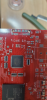
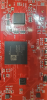
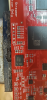
I am having some problems with the components being placed. The are getting placed off position slightly and rotated.
I saw some people said the machine auto finds the fudicials, how do I enable this? When loading the board it comes up with 3 components to calibrate to.
This becomes a bit of a judgment call even more so once the paste has been put down.
I basically have to tweak all the ICs a bit and this either ends up making no solder point or shorts because the paste either sticks or all pushes.
I tried the two point setup on the components, but this didnt seem to help.
Thanks for any tips and tricks on getting the machine up and running!

- Comments(1)

A****min
Aug 31.2019, 12:16:53
1/ fiducials / ref components should be far apart to lower rounding errors. Ideally 3, at the furthest possible corners. If you use pads, double/tripple check the pad coordinates. I had dumb issues with ECAD footprints generating off center "centroid" coordinates....
2/ there's no "auto find" fiducials. You basically tell the machine where they should be, teach the vision system the "Eigenvalue" of the fiducial (on machine) and then I compares the machine coordinates to the expected ones and rotates / translates everything else accordingly.
3/ be aware of the placement height. If you told the machine to do "0" always, it might happen that the component rotates/slides every so slightly when the paste is squasched out when you "ram" the component down.
4/ play with the "wait before lift/release" parameters so that the nozzle vaccum has time to fully release before retraction
5/ reduce machine speed to test
6/ have a look at what the vision system sees (in step by step mode you can watch what it does nicely). I had my learning curve there. Make sure there's no stray light and close the lid (that matters!)
7/ check board origin in the diagnostics menu
Hope this helps