日本語
日本語
 한국어
한국어

Learn CNC Programming: A Practical Beginner's Guide
QUICK ANSWER To learn CNC programming, first master machine safety, coordinates, work offsets, tool offsets, and a small set of G and M codes. Write and simulate simple programs, learn one controller's dialect, then add CAM. Prove every new program with verification, a controlled dry run, and a measured test part under qualified supervision.
A CNC program can move a heavy machine, spin a cutting tool, and place that tool close to a clamp. The fastest learners connect code to setup, simulation, inspection, and safe shop habits from the first day.
What does CNC programming include?
CNC programming is the process of turning a part requirement into machine-readable instructions for motion, spindle control, tool changes, coolant, and other functions. Manual G code is one route, but modern work also includes CAD, CAM, post processing, setup data, and verification.
The NIST RS274/NGC reference explains that RS274 implementations differ between machine makers. That is why a program that works on one controller should never be assumed to work unchanged on another.
A useful mental model has four layers: part geometry defines what must be made, the process plan defines tools and operations, CAM or manual programming defines motion, and the machine setup makes those coordinates real. A weak layer can invalidate all the others.
Which learning path should a beginner choose?
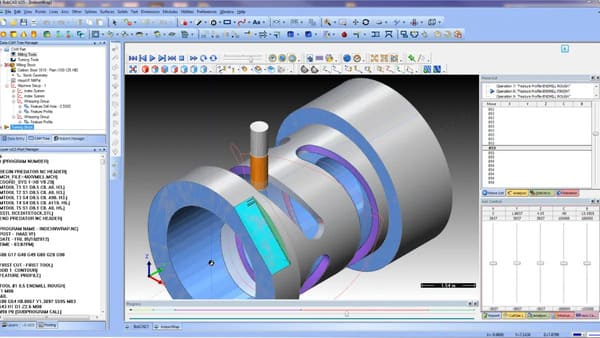
Beginners should learn enough manual G code to read and audit a program, then use CAM for geometry that would be slow or risky to calculate by hand. Conversational programming is valuable for simple shop floor features, but it does not replace an understanding of coordinates and machine state.
| Method | Best use | Knowledge required | Beginner sequence |
|---|---|---|---|
| Manual G code | Simple moves, edits, code literacy | Coordinates, modes, offsets | Start here |
| CAM | Profiles, pockets, 3D surfaces, repeat work | CAD, tools, setups, posts | Add after basics |
| Conversational | Facing, drilling, slots, quick one-offs | Control prompts and setup | Learn on your machine |
For example, Autodesk Fusion for Manufacturing integrates CAD and CAM and can create toolpaths for milling and turning. The post processor still has to match the target machine and controller.
What should you learn before writing a full program?
Before writing a full program, understand how the machine establishes position, how modal commands persist, and how the real tool relates to the programmed path.
Machine and work coordinates: Know the difference between machine zero and part zero, and understand how a work offset such as G54 locates the part coordinate system.
Absolute and incremental motion: G90 normally interprets coordinates from a fixed origin, while G91 interprets them from the current position. Confusing the two can send an axis to an unexpected location.
Tool and geometry offsets: A controller needs accurate tool length and diameter information. Learn how your machine stores and calls those values before cutting.
Feeds, speeds, and cutting conditions: Use the tool manufacturer's data and shop guidance as a starting point. Material, tool diameter, number of flutes, rigidity, and engagement all affect a safe value.
Print reading and measurement: Programming ends with a measured part. Practice datums, tolerances, calipers, micrometers, and inspection notes alongside code.
Which G codes and M codes matter first?
The first code set should cover controlled motion, units, planes, distance mode, offsets, spindle state, coolant, and program end. Meanings can vary by controller, so the machine manual remains the final authority.
Motion: G00 commands rapid positioning, G01 commands linear feed motion, and G02 or G03 command circular motion in common mill dialects.
Modes: G17 selects the XY plane, G20 or G21 selects inch or metric units, and G90 or G91 selects absolute or incremental distance mode.
Offsets: G54 commonly selects a work coordinate system. A typical mill may use G43 with an H address to apply tool length compensation.
Machine functions: M03 commonly starts the spindle clockwise, M05 stops it, M08 starts coolant, M09 stops coolant, and M30 ends and resets a program.
The LinuxCNC G code overview describes a program as lines or blocks made from letters and number words. It also groups modal codes, which helps explain why a mode can remain active across later blocks.
A competency-based roadmap to learn CNC programming
A good roadmap advances when you can demonstrate a skill reliably, not when a calendar reaches a certain day.
Read and predict: Trace simple blocks on graph paper or in a simulator. Explain the endpoint, active mode, feed, spindle state, and coordinate system after every line.
Edit one variable: Change one coordinate, feed, depth, or arc value at a time, then compare the simulated result with your prediction.
Program three simple features: Write or generate a faced surface, a drilled hole pattern, and a rectangular profile. Create a setup sheet for each job.
Post from CAM: Model a simple bracket, define stock and tools, generate 2D operations, choose the correct post, and audit the output before it reaches the control.
Prove and inspect: Under qualified supervision, verify offsets, run the approved prove-out procedure, cut test material, inspect the first feature, and record corrections.
Build controlled repetition: Repeat the part using saved tools, fixtures, offsets, revisions, and inspection results. Reliability matters more than adding advanced cycles early.
What is the safest way to test a new CNC program?
A new CNC program should pass digital verification and a machine-specific prove-out before cutting. Simulation can reveal toolpath errors, but it cannot confirm the actual clamps, installed tool, work offset, or machine condition.
Verify the file: Confirm controller dialect, units, plane, coordinate mode, work offset, tool calls, spindle direction, coolant logic, retract height, and program end.
Verify the setup: Match the setup sheet to the stock, fixture, tools, holders, offsets, and clearance envelope on the machine.
Use the shop's prove-out procedure: Backplot and follow approved practices for optional stop, single block, overrides, or dry run. Keep Feed Hold and emergency controls accessible.
Inspect early: Stop after the first feature when the process allows, measure it, and correct approved offsets before running the full batch.
The OSHA machine guarding guidance identifies rotating parts, flying chips, and point of operation hazards as reasons for effective safeguarding. Online learning cannot replace machine-specific training, supervision, or the employer's safety procedures.
Which beginner projects build real programming skill?
The best beginner projects isolate one new idea while keeping geometry easy to inspect.
Coordinate plate: Simulate a square and diagonal to practice G00, G01, G90, safe Z moves, and comments.
Four hole plate: Program a hole pattern to practice coordinates, a work offset, and center distance inspection.
Profiled spacer: Cut a rectangular profile to practice tool diameter, depth steps, and dimensional correction.
Pocketed bracket: Use CAM for a pocket, profile, and holes, then audit tools, offsets, modes, and retracts.
Keep the print, code, CAM file, post name, setup sheet, simulator image, inspection result, and revision note. Together they form a useful portfolio and troubleshooting record.
Frequently asked questions about learning CNC programming
How long does it take to learn CNC programming?
You can learn to read and simulate simple programs within weeks of regular practice, but independent machine programming takes longer because setup, tooling, inspection, safety, and controller knowledge develop through supervised experience. Judge progress by demonstrated competencies, not a fixed deadline.
Do I need to learn G code if I use CAM?
Yes. You do not need to hand calculate every complex path, but you should understand motion, modes, offsets, tool calls, spindle and coolant commands, and program completion well enough to audit posted output.
Can I learn CNC programming without owning a machine?
Yes. You can study manuals, write code, use a simulator, and build CAM projects without a machine. Safe physical setup and proving out skills still require supervised access through a school, makerspace, apprenticeship, or shop.
Should I learn CNC milling or turning first?
Start with the machine type you can access safely and use consistently. Milling often makes coordinate visualization easier for beginners, while turning introduces diameter programming, tool nose compensation, and constant surface speed concepts.
Learn to control the whole process
To learn CNC programming well, connect every line of code to machine state, setup, cutting conditions, and inspection. Start with readable manual programs, add CAM once the fundamentals are clear, and treat verification and supervised prove-out as part of programming rather than as optional checks.