日本語
日本語
 한국어
한국어

Free CAM Software: 7 Practical Tools to Use in 2026
QUICK ANSWER The best free CAM software depends on the job. FreeCAD suits unrestricted CAD and CAM, Fusion fits qualified noncommercial users, Kiri: Moto works in a browser, Carbide Create simplifies router projects, Easel combines design and control, OpenBuilds CAM handles quick vector jobs, and bCNC pairs basic CAM with GRBL control.
A zero-dollar download can still cost a spoiled workpiece if it lacks the right post processor, machining strategy, or license. The useful question is not which program has the longest feature list. It is which program can create safe toolpaths for your machine and your intended use.
This guide compares seven current options, explains the limits behind the word free, and gives a practical workflow for testing output before the first cut.
What Qualifies as Free CAM Software?
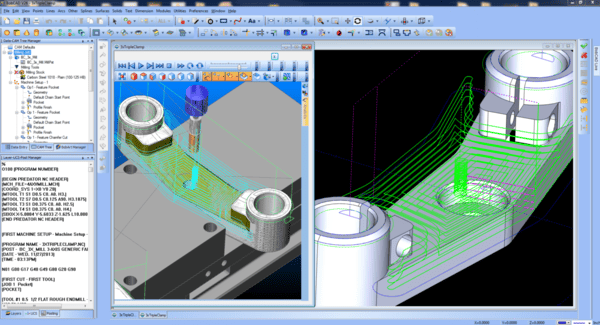
Free CAM software creates machining toolpaths and exports machine instructions without requiring payment for the stated use. Some products are open source and unrestricted, while others are free only for personal projects or place limits on exports, advanced strategies, or commercial revenue.
Keep the software chain clear. CAD defines geometry, CAM converts geometry into toolpaths, a post processor writes the controller-specific G code, and a sender streams that code to the machine. One application may cover several stages, but a sender with a visualizer is not automatically a CAM system.
Autodesk states that Fusion for personal use is a three-year subscription for qualifying home-based, noncommercial work and includes limited CAM functionality. That is a valid free option, but it is not the same license model as FreeCAD or bCNC.
Which Free CAM Software Belongs on Your Shortlist?
The strongest shortlist spans unrestricted desktop software, qualified free plans, browser tools, and machine-focused utilities. The comparison below uses the current official license or product description wherever one is published.
| Software | Platform | Machining scope | Free status | Best fit |
|---|---|---|---|---|
| FreeCAD | Windows, macOS, Linux | 2.5D and 3D milling | Open source, unrestricted | Integrated CAD and CAM |
| Fusion for personal use | Windows, macOS | Basic 2D and 3D CAM | Qualified noncommercial use | Advanced hobby projects |
| Kiri: Moto | Web browser | CNC milling, laser, 3D print | Free browser tool | Fast cross platform setup |
| Carbide Create | Windows, macOS | 2D and 2.5D routing | Free, no license code | Signs, pockets, profiles |
| Easel Free | Web browser | Basic CAD, CAM, control | One carve or export weekly | First CNC router projects |
| OpenBuilds CAM | Web browser | 2D and 2.5D vectors | Free | DXF, SVG, image jobs |
| bCNC | Desktop, Raspberry Pi | Basic CAM plus sender | Open source | GRBL machines and probing |
What Each Free CAM Tool Does Best
Each tool earns its place through a distinct workflow advantage, not by being universally best.
FreeCAD for Unrestricted Parametric CAD and CAM
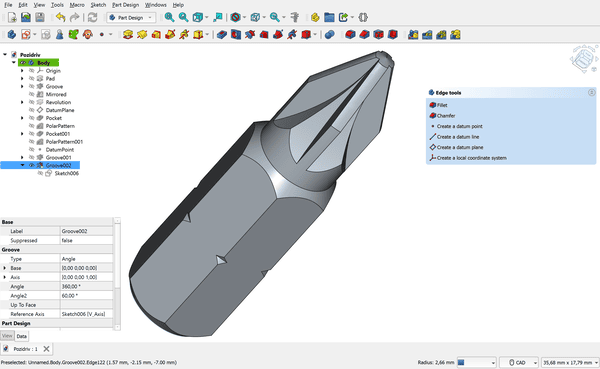
FreeCAD is the strongest open source choice for modeling, setup, toolpaths, simulation, and G-code export in one desktop application. FreeCAD 1.0 renamed the Path workbench to the CAM workbench and added a new simulator. The interface takes time to learn, but the software has no paywall or commercial use restriction.
Fusion for Personal Use for Capable Hobby Machining
Fusion for personal use gives qualifying home users a polished CAD and CAM environment for noncommercial projects. Autodesk describes a three-year term and limits parts of CAM, drawings, electronics, and collaboration. Recheck the license before earning revenue from the work.
Kiri: Moto for Browser-Based, Cross-Platform Work
Kiri: Moto is a browser-based toolpath generator for CNC mills, laser cutters, and 3D printers. It is useful on shared computers or systems where installation is inconvenient. Confirm machine dimensions, tools, units, origin, and exported code before cutting.
Carbide Create for Approachable Router Projects
Carbide Create combines drawing tools with 2D and 2.5D CAM for profiles, pockets, drilling, and engraving. Carbide 3D says it runs on Windows and macOS, uses no license codes, and supports unlimited installations. It is a practical start for signs, plates, and flat stock.
Easel Free for an All-in-One First Workflow
Easel Free combines browser-based design, automated toolpaths, cut settings, and machine control. The current free plan permits one carve or G-code export per week. 3D carving, V carving, tiling, and unlimited output sit in paid plans, so it fits occasional work better than frequent production.
OpenBuilds CAM for Quick Vector Toolpaths
OpenBuilds CAM turns DXF polylines, SVG paths, traceable images, text, and built-in shapes into G code in a browser. It suits direct 2D and 2.5D jobs, but not complex three-dimensional surface machining from solid models.
bCNC for GRBL Control With Basic CAM
bCNC is a GRBL sender, probe, autoleveler, editor, and workshop utility with basic CAM. Its project lists profiling, pocketing, drilling, ramp cutting, thread milling, tabs, drag knife work, and mesh slicing. Choose it when machine control and probing matter as much as toolpath creation.
How Should You Choose Free CAM Software for Your Machine?
The right choice is the program whose license, geometry support, post processor, and safety checks match the complete job.
License and output limits: Classify the work as personal, educational, or commercial. Record renewal dates and revenue or export restrictions.
Geometry and operations: Flat signs may need only profiles, pockets, drilling, and V carving. Molds, reliefs, and contoured parts need true 3D roughing and finishing strategies.
Controller and post processor: Verify GRBL, LinuxCNC, Mach, Fanuc, or the exact machine-specific post rather than selecting generic code by habit.
Platform and connectivity: Confirm operating system support and whether cloud access is required to open or export a job.
Simulation and recovery: Preview rapids, retracts, stock removal, collisions, and tool changes. For repeat work, save machine profiles, tools, setups, and revisions.
What Is a Safe First Cut Workflow With Free CAM Software?
A safe first cut workflow verifies the digital setup, exported code, and physical machine state before the tool enters material.
Define the job: Record material, stock size, workholding, tool, spindle speed, feed, depth of cut, origin, and controller.
Build conservative toolpaths: Start with a simple profile or pocket and leave enough retract height to clear clamps and fixtures.
Simulate and inspect: Check the toolpath preview, then open the exported G code in an independent visualizer when the part or setup is unfamiliar.
Prove the machine state: Confirm units, work zero, tool length, spindle direction, soft limits, and emergency stop access. Run above the stock or use single block mode if the controller supports it.
Cut a test piece: Use inexpensive material, measure the result, correct the process, and keep the approved CAM file with its post processor and revision.
From Free CAM Software to a Reliable CNC Workflow
Free CAM software makes sense when you have access to a CNC machine and want direct control over toolpaths, cutting parameters, and G-code. However, software alone cannot produce a reliable part. You also need suitable tooling, secure workholding, a compatible post-processor, a proven machine setup, and the equipment required to inspect the finished dimensions.
For a one-off prototype or a small production run, building and validating that entire process may take more time than expected. If your main goal is to receive finished parts rather than operate the machine yourself, outsourcing the work can be the more practical option.
A CNC machining supplier will normally ask for the design data rather than G-code, because G-code depends on the supplier’s machines, controllers, tools, and fixtures. For an accurate quotation, prepare:
A 3D CAD model, preferably in STEP format
A 2D drawing showing critical dimensions and tolerances
The required material and surface finish
Thread, insert, and inspection requirements
The quantity and desired delivery schedule
PCBgogo provides CNC machining services for rapid prototypes and custom production parts in metals and engineering plastics. Its manufacturing team can review the design for machinability, create the appropriate CAM program for its equipment, plan the machining process, and inspect the finished parts against the specified requirements.
Which Mistakes Cause the Most Trouble in Free CAM?
Most free CAM failures come from setup assumptions rather than the purchase price of the software.
Confusing CAM with a sender: CNCjs and many controller applications load and visualize existing G code but do not create full machining strategies from a CAD model.
Using the wrong post: Similar controllers can interpret arcs, canned cycles, tool changes, and probing commands differently. Test a minimal file before a long program.
Trusting default feeds: A library value cannot know your machine rigidity, spindle, tool stickout, workholding, or material batch. Treat defaults as inputs to verify, not guarantees.
Skipping a dry run: Simulation does not confirm the real clamp locations, tool length, work zero, or spindle state. Verify both the screen and the machine.
Frequently Asked Questions About Free CAM Software
Is there completely free CAM software for commercial use?
Yes. Open source tools such as FreeCAD and bCNC can be used without a subscription, subject to their software licenses. Free plans from commercial vendors may restrict business use, revenue, features, or output frequency.
What is the easiest free CAM software for a CNC router?
Carbide Create and Easel are among the easiest starting points for flat router work. Easel offers the most integrated beginner flow, while Carbide Create avoids the current one export or carve per week limit.
Can free CAM software generate 3D toolpaths?
Yes. FreeCAD, qualified Fusion personal licenses, and Kiri: Moto can generate three-dimensional CNC toolpaths. Confirm that the specific roughing, finishing, and post-processing features you need are included.
Do I need a separate G code sender?
Sometimes. FreeCAD, Fusion, Kiri: Moto, Carbide Create, and OpenBuilds CAM primarily create or export code, while bCNC also sends it. Easel can combine design, CAM, and control for supported machines.
Can I use free CAM software for production parts?
You can when the license allows commercial use and the output is proven for the machine. Production also needs controlled posts, tool data, simulation, inspection, backups, and support that a free package may not provide.
Choose the Workflow Before the Feature List
Free CAM software is valuable when its license and machining scope match the job, its post processor matches the controller, and its output passes simulation and a controlled prove-out. Start with one representative part, document every setup assumption, and expand only after the complete chain from geometry to measured result is reliable.