日本語
日本語
 한국어
한국어

Top 10 Free Gerber File Viewer Tools to Open and Inspect Gerber Files
Every PCB design ends the same way: a folder of Gerber files that need one last look before they go to the fabricator. A free Gerber file viewer lets you do that check in minutes, without buying a CAM seat or installing anything you'll only use once. This guide covers 10 free Gerber file readers worth knowing in 2026 — from full-featured online platforms to lightweight desktop tools — and shows you exactly how to pick the right one for your workflow, whether you're a student verifying a first export or an engineer running a pre-order sanity check.
What Is a Gerber File Viewer, and Why Do You Need One?
A Gerber file is the standard format that PCB design software uses to describe a board to a manufacturer — one file per layer, covering copper traces, solder mask, silkscreen, board outline, and drill data (typically in Excellon format). Gerber files come in two flavors still in wide use: the legacy RS-274X format and the newer Gerber X2 standard, which embeds extra layer metadata directly in the file.
A Gerber file reader takes that machine-readable data and renders it as a visual image of the finished board, layer by layer. Instead of trusting that your CAD export went smoothly, you can actually see it. Common reasons to open a Gerber file online or in a desktop viewer before submitting a design include:
Confirming every layer exported correctly — no missing copper layer, solder mask, or silkscreen file
Checking that drill holes line up with pads and vias
Spotting aperture or trace-width mistakes that wouldn't show up in the CAD editor
Sharing a visual preview with a colleague or manufacturer who doesn't use your EDA tool
Verifying panelization, tooling holes, and board outline before a production run
A missed layer or reversed mirror setting can turn into a scrapped board and a week of delay. A two-minute review in a Gerber viewer is cheap insurance against that outcome.
Quick Comparison: 10 Free Gerber Viewers at a Glance
| Tool | Type | 3D View | Best For |
|---|---|---|---|
| Altium 365 Viewer | Online | Yes | Team collaboration & 3D review |
| PCBgogo Online Viewer | Online | No | Fast, order-ready file checks |
| KiCad GerbView | Desktop | No | KiCad users & open-source workflows |
| ZofzPCB | Desktop | Yes | Layer-peeling 3D inspection |
| Gerbv | Desktop | No | Offline, IP-sensitive review |
| Tracespace | Online | No | Open-source, client-side rendering |
| GerbLook | Online | No | Zero-friction, one-click checks |
| ViewMate (free) | Desktop | No | Reading difficult/legacy files |
| GerberLogix | Desktop | No | Free, feature-rich Windows viewer |
| GerbMagic | Desktop | No | Viewing legacy Protel-format PCB files |
Top Free Gerber File Viewers Reviewed
1. Altium 365 Viewer — Best for 3D Review and Team Collaboration
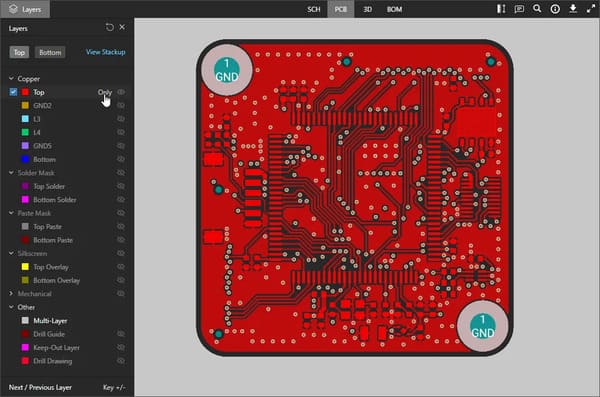
Altium 365 Viewer is a browser-based tool that renders Gerber RS-274X and X2 files, ODB++, IPC-2581, and native KiCad boards. Beyond flat layer inspection, it offers a genuine 2D/3D board view, schematic and BOM inspection for compatible projects, and a Gerber Compare feature that overlays two Gerber sets to highlight what changed between revisions. Designs can be shared through a time-limited link without either party creating an account.
Strong 2D and 3D visualization in one interface
Gerber Compare for catching differences between design revisions
No install or sign-up needed for the standalone viewer
No built-in DFM (design-for-manufacturing) rule checking
Best for: engineers who need rich visual review or want to diff two Gerber exports during design iteration.
2. PCBgogo Online Gerber Viewer — Best for Fast, No-Install File Checks
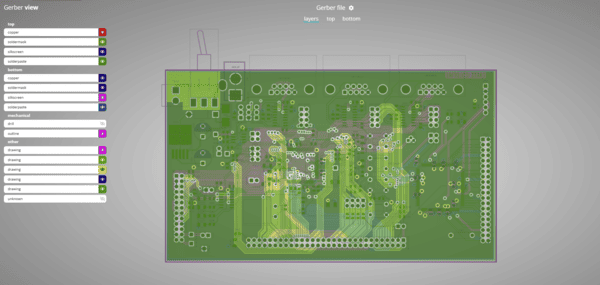
PCBgogo's free online Gerber viewer lets you upload Gerber and drill files directly, or as a single ZIP archive, straight from your browser. Once uploaded, you can step through each layer — copper, solder mask, silkscreen, and drill — check colors and render options, and confirm the board looks the way your design software intended, all without installing CAM software. Because the tool runs in the browser, it works equally well on a quick laptop check between meetings or a more thorough review at your desk.
Direct Gerber and drill file upload, or ZIP upload for convenience
Layer-by-layer viewing with adjustable colors and render options
No account or software installation required
Straightforward interface aimed at fast pre-submission checks rather than 3D or schematic review
Best for: anyone who wants a quick, browser-based way to confirm their Gerber export is correct before moving forward with fabrication — particularly useful if you're already comparing quotes or specs as part of your ordering process.
3. KiCad GerbView — Best Open-Source Desktop Option
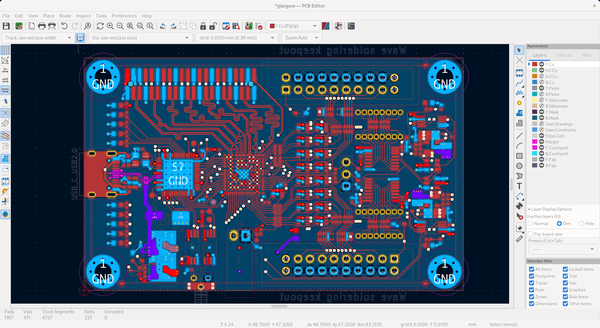
GerbView ships as part of the free, open-source KiCad EDA suite and works as a standalone Gerber and Excellon drill viewer, independent of whether your design was originally built in KiCad. Because it's a neutral third-party renderer, it's a useful cross-check against whatever tool generated your files — if GerbView shows the same thing your CAD software shows, you can be more confident the export was clean. Recent KiCad versions improved rendering accuracy and tie GerbView's output closer to KiCad's own design-rule checking.
Completely offline and free under an open-source license
Accurate RS-274X and Excellon drill rendering
Useful as a neutral second opinion regardless of originating EDA tool
Requires installing the full KiCad suite; no DFM analysis
Best for: KiCad users, and anyone who wants a trusted open-source renderer for a final desktop-side check.
4. ZofzPCB — Best for Layer-Peeling 3D Inspection
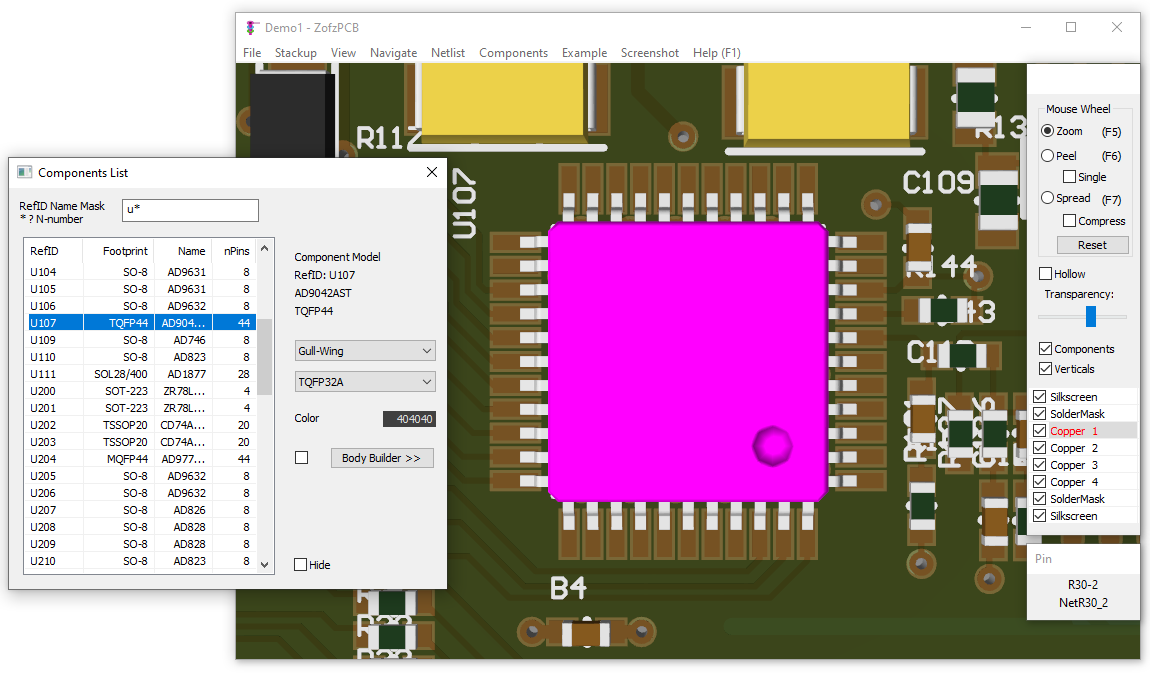
ZofzPCB is a free desktop viewer built around a distinctive "peel" interaction: you can separate copper, solder mask, silkscreen, and component layers from each other and inspect them individually in 3D, rather than looking at a single flattened image. It also supports wireframe and X-ray-style views, board rotation, and reports covering pins, nets, and detected errors.
3D peel view separates each layer for individual inspection
Wireframe and X-ray display modes
Generates summary reports on pins, nets, and errors
Desktop-only; steeper learning curve than a simple online uploader
Best for: designers who want a genuinely 3D, layer-by-layer look at a board rather than a flat 2D render.
5. Gerbv — Best for Offline, IP-Sensitive Review
Gerbv is a long-standing open-source desktop viewer, originally from the gEDA project, supporting RS-274X, Excellon drill, and CSV pick-and-place files. Because everything runs locally with no upload step, it's a common choice when a design simply can't leave the local machine for confidentiality reasons.
Fully offline — no file ever leaves your computer
Built-in measurement and layer analysis tools
Cross-platform: Windows, Linux, and macOS
Functional but dated interface; no DFM or 3D view
Best for: teams under strict confidentiality requirements who need a zero-upload, fully local viewer.
6. Tracespace — Best Open-Source Renderer for Client-Side Privacy
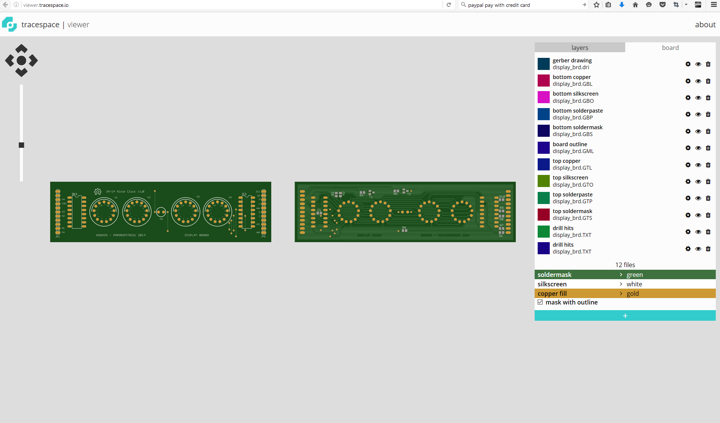
Tracespace is an open-source Gerber renderer available as a browser tool at viewer.tracespace.io, as well as a set of npm packages developers can embed elsewhere. It converts Gerber and NC drill files into precise SVG renders entirely in the browser — files never leave your machine, since the conversion happens client-side rather than on a server. Because it's MIT-licensed, several manufacturer portals and community tools use Tracespace's rendering engine under the hood.
Converts files to SVG locally, without a server upload step
Clean, print-quality layer renders with individual layer toggling
Open-source and embeddable in other tools
No 3D view or DFM checking
Best for: open-hardware developers and anyone who wants a transparent, privacy-first rendering tool.
7. GerbLook — Best for Zero-Friction, One-Click Checks
GerbLook is a no-frills browser-based viewer built around simplicity: upload a ZIP of your Gerber files and it renders a clean, color-coded image of each layer within seconds. It works on both desktop and mobile browsers, requires no account, and accepts files exported from most common EDA tools.
Upload-and-view workflow with no registration
Works on both desktop and mobile browsers
Accepts exports from a wide range of design tools
Focused purely on visual checks, with no measurement or DFM tools
Best for: students, hobbyists, and makers who just want a fast visual confirmation of their layers.
8. ViewMate (Free) — Best for Reading Difficult or Legacy Files
ViewMate is a Windows desktop viewer from PentaLogix that has been used by PCB designers for decades. The free version is view-only — you can inspect layers, overlay drill data, take measurements, and print, but you cannot save or export edits. Its main strength is reliability: it has a reputation for correctly reading unusual or malformed Gerber files that trip up newer, lighter-weight viewers.
Reads a wide range of Gerber, Excellon, and legacy CAM formats
Layer-by-layer viewing with measurement tools
Free tier requires registration and is Windows-only
No save/export in the free version; upgrades add editing and DFM
Best for: designers who occasionally receive awkward or non-standard Gerber exports that other viewers struggle with.
9. GerberLogix — Best Free, Feature-Rich Viewer for Windows
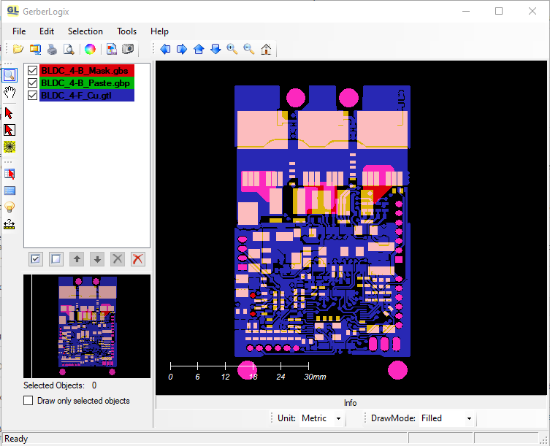
GerberLogix, from German CAM software maker EasyLogix, is a free Windows desktop viewer for Gerber RS-274X/X2 and Excellon drill files (the free license covers non-commercial use). It auto-detects file types on import, accepts compressed ZIP files directly, and gives you per-layer control — showing, hiding, reordering, and recoloring layers — along with distance measurement between points, objects, and centers. Finished views can be exported as TIFF, JPG, PNG, or BMP images.
Free for non-commercial use, with a paid license for commercial work
Auto-detects Gerber/Excellon file types and accepts ZIP uploads
Layer reordering, recoloring, and point-to-point measurement tools
Windows-only desktop application
Best for: Windows users who want a full-featured free desktop viewer with more layer control than a basic online uploader.
10. GerbMagic — Best for Viewing Legacy Protel-Format PCB Files
GerbMagic, from Bronzware Inc., is a Windows viewer built around a specific niche: it reads both Gerber RS-274X files and legacy Protel ASCII PCB files (Protel versions 1.57 through 2.8), which many modern viewers no longer support. Beyond viewing, it converts those formats to PostScript, PDF, TIFF, BMP, and RID output at high resolution. It's distributed as shareware with a limited number of free launches before continued use requires a license.
Reads legacy Protel ASCII PCB files alongside standard Gerber RS-274X
Converts to PostScript, PDF, TIFF, BMP, and RID formats
High-resolution output, useful for archival or photoplotting needs
Free usage is limited before a license is required; Windows-only
Best for: engineers who occasionally need to open old Protel-format PCB files that other modern viewers can't read.
For most day-to-day checks, an online viewer like PCBgogo or Altium 365 gets you a fast answer with no install. Reach for a desktop tool like KiCad GerbView or Gerbv when you need a fully offline review, and ZofzPCB when you specifically want a 3D, layer-by-layer breakdown of the board.
How to Open a Gerber File Online in 3 Steps
Opening a Gerber file online doesn't require any special software. The general process is the same across most free online viewers:
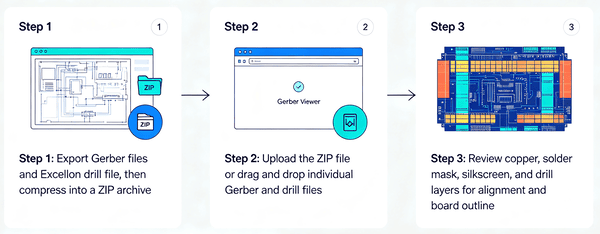
Step 1: Export your Gerber files (and Excellon drill file) from your PCB design software, then compress them into a single ZIP archive.
Step 2: Open a browser-based Gerber viewer and upload the ZIP file, or drag and drop individual Gerber and drill files if the tool supports it.
Step 3: Review each layer — copper, solder mask, silkscreen, and drill — checking alignment, colors, and board outline before you consider the file ready for fabrication.
Most online viewers auto-detect which file belongs to which layer, but it's worth double-checking layer assignment manually on your first upload with any new tool, since naming conventions vary between EDA programs.
Choosing the Right Gerber Viewer for Your Workflow
| If you need to... | Try this viewer |
|---|---|
| Do a fast check before submitting a design | PCBgogo Online Viewer |
| Review 3D geometry or compare two revisions | Altium 365 Viewer |
| Cross-check a KiCad export with a neutral renderer | KiCad GerbView |
| Inspect layers individually in 3D | ZofzPCB |
| Keep files fully offline for IP security | Gerbv |
| Render files client-side with an open-source tool | Tracespace |
| Get the simplest possible one-click preview | GerbLook |
| Open an unusual or legacy Gerber export | ViewMate (free) |
| Get full layer control in a free Windows app | GerberLogix |
| Open an old Protel-format PCB design | GerbMagic |
PCB Layout and Assembly Considerations When Reviewing Gerbers
A Gerber viewer is only useful if you know what to look for once the layers are on screen. Beyond confirming that files opened correctly, a thorough review before fabrication should cover:
Layer order and count — make sure every copper layer, plane, and mask matches your intended stack-up
Aperture list — unusual or mismatched apertures can indicate a corrupted or incomplete export
Drill-to-pad alignment — misaligned drill data is one of the most common causes of failed continuity
Silkscreen-to-solder-mask clearance — overlapping silkscreen on exposed pads can cause poor solder joints
Board outline and panelization marks — confirm mounting holes, tooling strips, and V-scoring lines are present where expected
Catching these issues in a viewer, before the files reach a fabricator, is far cheaper than catching them after a board comes back from production.
PCBgogo's Capabilities: From File Review to Finished Boards
PCBgogo's free online Gerber viewer is built for the moment right before you commit to fabrication: upload your files, confirm every layer looks correct, and move forward with confidence. That same review-first approach carries through the rest of PCBgogo's process — ISO 9001:2015 and UL-certified fabrication, DFM checking, X-ray inspection for BGA and other hidden-joint components, and precision SMT assembly for boards that need to go from Gerber file to finished product without a lot of back-and-forth.
Whether you're a hobbyist checking a first KiCad export or an engineer validating a multilayer HDI design, having a reliable Gerber viewer and a manufacturing partner that reads those files the same way removes one more point of friction between design and delivery.
Frequently Asked Questions
What is a free Gerber file viewer?
A free Gerber file viewer is a tool — either browser-based or a downloadable desktop application — that renders Gerber and Excellon drill files as a visual image of a PCB, layer by layer, without charging for the software.
Is it safe to upload Gerber files to an online viewer?
It depends on the specific service and how sensitive your design is. For most hobbyist and commercial designs, reputable browser-based viewers are fine to use. For designs with strict confidentiality requirements, an offline desktop viewer such as KiCad GerbView or Gerbv avoids any upload step entirely. Always check a service's privacy policy if you're unsure.
Can I open a Gerber file online without installing any software?
Yes. Online Gerber viewers such as Altium 365 Viewer and PCBgogo's Online Gerber Viewer run entirely in your browser — you upload your files and view the rendered layers with no installation required.
What's the difference between a Gerber viewer and a Gerber editor?
A Gerber viewer only displays the file for visual inspection. A Gerber editor allows you to modify the underlying data — adding traces, changing apertures, or adjusting layers directly. Most free tools covered here are viewers rather than full editors.
Which free Gerber viewer is best for 3D inspection?
ZofzPCB stands out for 3D inspection because of its layer-peeling feature, which lets you separate and examine copper, solder mask, and component layers individually in three dimensions. Altium 365 Viewer also offers solid 3D board visualization alongside schematic and BOM views.