日本語
日本語
 한국어
한국어

ESP32 vs Arduino Practical PCB Design and IoT Guide
QUICK ANSWER ESP32 vs. Arduino is mainly a choice between connected processing and simple control. Choose ESP32 for integrated Wi-Fi, Bluetooth, larger memory, and multitasking. Choose an Arduino Uno-style design for straightforward 5 V I/O and predictable single-loop control. For a custom PCB, power, RF placement, voltage compatibility, and assembly risk matter as much as firmware.
Introduction
A development board can make two controllers look interchangeable, but the differences become expensive when the prototype moves to a custom PCB. The better choice is the one that meets the product's connectivity and timing needs without creating avoidable power, RF, or assembly problems.
What Is ESP32
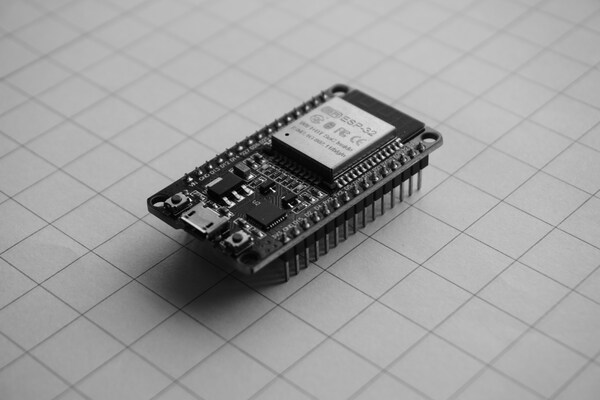
ESP32 is a family of 32-bit system-on-chip devices designed for connected embedded products. The original dual-core ESP32 can run at up to 240 MHz, provides 520 KB SRAM, and integrates 2.4 GHz Wi-Fi plus Bluetooth, although exact features vary by family member.
An ESP32 module reduces design risk by integrating the SoC, flash, crystal, RF matching, and antenna. It still needs a stable 3.3 V rail, correct boot-strapping, local decoupling, and antenna clearance.
What Is Arduino
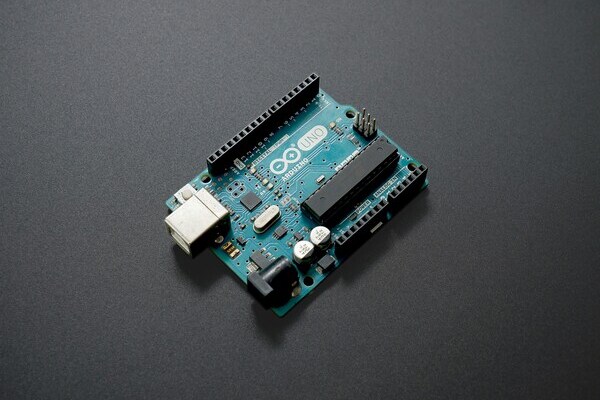
Arduino is a hardware and software ecosystem rather than one microcontroller. To make ESP32 vs Arduino concrete, this guide uses the classic Arduino Uno R3 and its ATmega328P as the baseline: an 8-bit MCU running at 16 MHz with 32 KB flash, 2 KB SRAM, 14 digital I/O pins, and 5 V logic.
A production PCB usually carries the MCU and only the required support circuitry, avoiding bulky Uno headers and an unnecessary USB interface.
What Is the Difference Between ESP32 and Arduino
The practical difference is that ESP32 integrates wireless networking and far more computing resources, while an Arduino Uno-style circuit favors simplicity and 5 V interfacing. The comparison below uses common reference designs, not every product sold under either name.
| Design factor | ESP32 reference | Arduino Uno R3 reference |
|---|---|---|
| CPU and memory | Up to 240 MHz dual-core; 520 KB SRAM | 16 MHz 8 bit; 2 KB SRAM |
| Wireless | Integrated Wi-Fi and Bluetooth | Requires an added radio or shield |
| Logic level | 3.3 V; GPIO is not 5 V tolerant | 5 V I/O on the classic Uno |
| Firmware model | RTOS capable; networking can add timing jitter | Simple sequential loop; easier timing analysis |
| PCB impact | RF keepout and higher transient current | No RF keepout unless a radio is added |
ESP32 and Arduino Architecture Comparison
In the ESP32 vs Arduino architecture comparison, ESP32 combines CPU cores, radio blocks, security hardware, and peripherals in one SoC, while the Uno R3 centers on a smaller AVR MCU and a separate USB-to-serial device. ESP32 can keep networking active while application tasks run, but an RTOS requires deliberate priorities and watchdog handling.
The ATmega328P is easier to audit for small control loops, but TLS, large displays, and over-the-air updates can exceed its resources quickly. Architecture should follow the workload, not headline clock speed.
When to Use ESP32 vs Arduino
Use ESP32 when wireless communication, secure updates, multitasking, or larger data buffers are core requirements; use Arduino when the task is small, timing is simple, and direct 5 V compatibility reduces hardware. A useful selection check is to list mandatory interfaces, worst-case RAM, timing deadlines, and sleep current before choosing the board.
A battery sensor can benefit from ESP32 deep sleep despite high radio current. A permanently powered relay sequencer with no network usually favors the smaller Arduino firmware path.
ESP32 vs Arduino for IoT Projects
ESP32 is usually the stronger IoT platform because Wi-Fi, Bluetooth, cryptographic acceleration, and over-the-air update support are available without a second controller. The original ESP32 supports 2.4 GHz 802.11 b g n Wi-Fi and Bluetooth 4.2, while its deep-sleep current is specified at 10 microamps under datasheet conditions.
Battery life still depends on the complete PCB. Budget regulator quiescent current, sensor standby current, LEDs, and radio peaks, then measure an assembled product across a full connection cycle.
ESP32 and Arduino in PCB Design and Assembly
PCB implementation is where ESP32 vs Arduino creates the largest difference in layout and production risk. Use this checklist before releasing Gerbers and assembly files:
ESP32 antenna placement: Place a module antenna at the board edge when possible. Keep copper, traces, and components out of the antenna zone on every layer and allow at least 15 mm clearance around it when it cannot extend past the carrier board edge.
Power integrity: Size the 3.3 V regulator and bulk capacitance for radio current bursts, keep decoupling close to supply pins, and use an uninterrupted ground return. Confirm reset behavior during Wi-Fi transmission.
Voltage domains: Do not connect 5 V Arduino peripherals directly to ESP32 GPIO. Add level shifting or choose 3.3 V compatible parts, and check pull-up rails on I2C buses.
Programming access: Expose reset, boot, power, ground, and UART or native USB test points. Verify that strapping pins are not forced into the wrong state by attached peripherals.
Assembly choice: A castellated ESP32 module simplifies RF implementation but needs correct land geometry and paste control. An ATmega328P has no antenna constraint but may need a clock and programming header.
Before ordering, run DFM checks on the footprint, solder mask, test points, and orientation. PCBgogo can fabricate and assemble the validated design; identify the exact module or MCU revision and approved alternates in the engineering package.
ESP32 and Arduino Advantages and Disadvantages
The best platform is the one whose disadvantages are easiest to control in the finished product.
| Platform | Advantages | Tradeoffs |
|---|---|---|
| ESP32 | Integrated wireless, high processing capacity, larger memory, sleep modes, OTA capability | 3.3 V only, RF layout constraints, higher peak current, more complex firmware timing |
| Arduino Uno path | Simple firmware, predictable control, 5 V I/O, mature learning resources | No integrated wireless, very limited RAM and flash, added hardware for modern IoT security |
Conclusion
The ESP32 vs Arduino decision is simple: choose ESP32 for connected products that need wireless networking and headroom, or an Arduino Uno style design for focused 5 V control. Before committing the PCB, validate peak current, logic levels, antenna clearance, programming access, and the exact production package.
PCBgogo - Reliable, High-Quality PCB Manufacturing
PCBgogo is a one-stop PCB and PCBA manufacturing factory, helping you save time and costs while ensuring consistent, reliable quality.
Get a Free Quote >
Frequently Asked Questions
Can ESP32 be programmed with the Arduino IDE
Yes. The Arduino core for ESP32 supports familiar sketches and libraries, although hardware-specific code and timing assumptions may need changes.
Can an ESP32 replace an Arduino Uno on the same PCB
Not directly. ESP32 uses 3.3 V logic, has different pin functions and boot straps, and needs RF and power provisions that the Uno does not.
Should a production PCB use an ESP32 module or bare chip
A module is usually the lower-risk choice for moderate volumes because the RF section, flash, crystal, and antenna are integrated. A bare chip can reduce size or unit cost, but it adds RF design, sourcing, and validation work.
What files should be checked before PCB assembly
Check Gerbers, drill data, BOM, centroid data, assembly drawings, polarity marks, and exact component revisions. Include a programming and functional test plan.